
Tempo is an interval timer for iPhone and iPad (it requires iOS 26) where each interval can run on time or on GPS distance, and with Premium on a step count too. It's free with an ad before a workout starts and a limit on saved custom workouts; Tempo Premium is $0.99 a week or $5.99 once, and adds unlimited custom workouts, no start ads, video mode, step-based intervals, and live heart rate, calories and steps. I built Tempo because I wanted one timer for Tabata, run intervals and interval walking. This guide walks through setting up each one. For screenshots and the download link, see the Tempo app page.
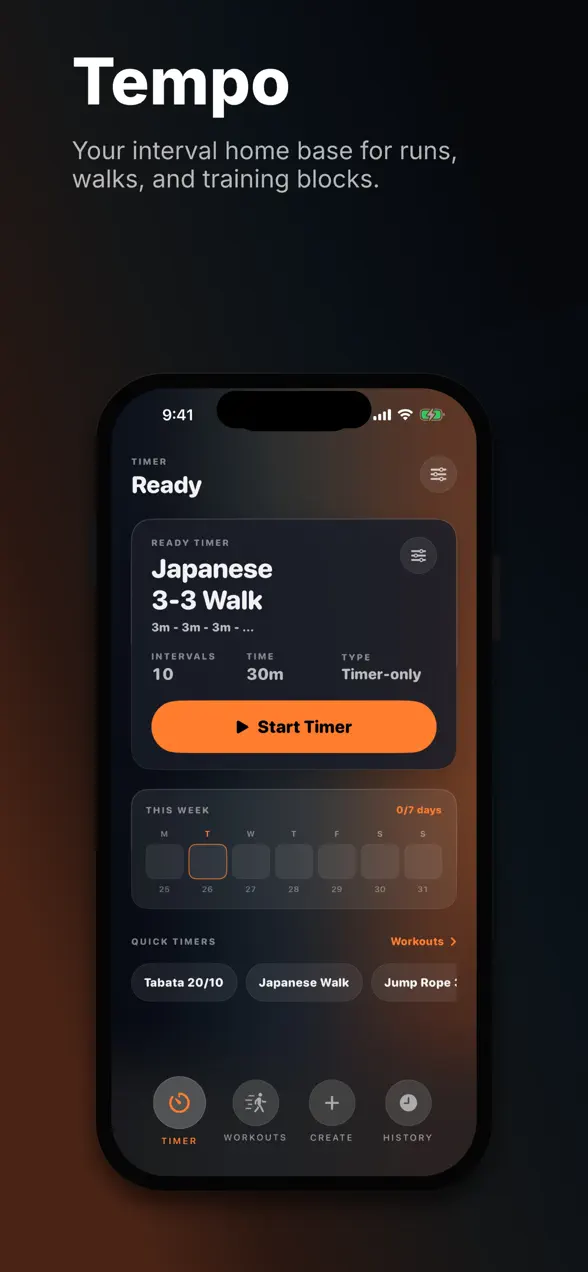
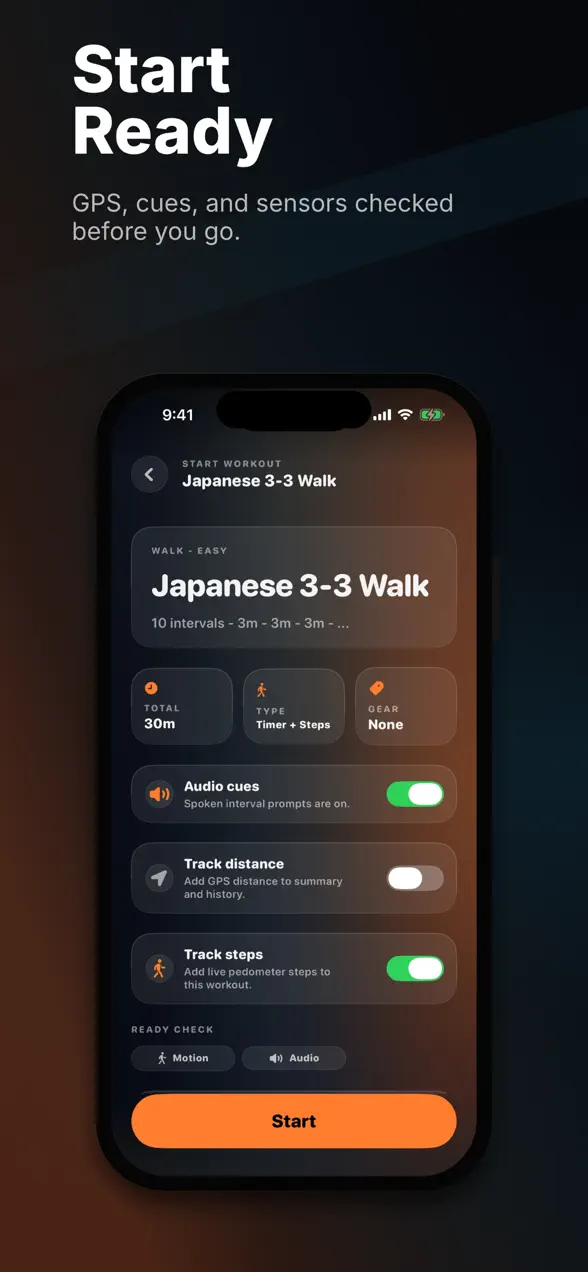
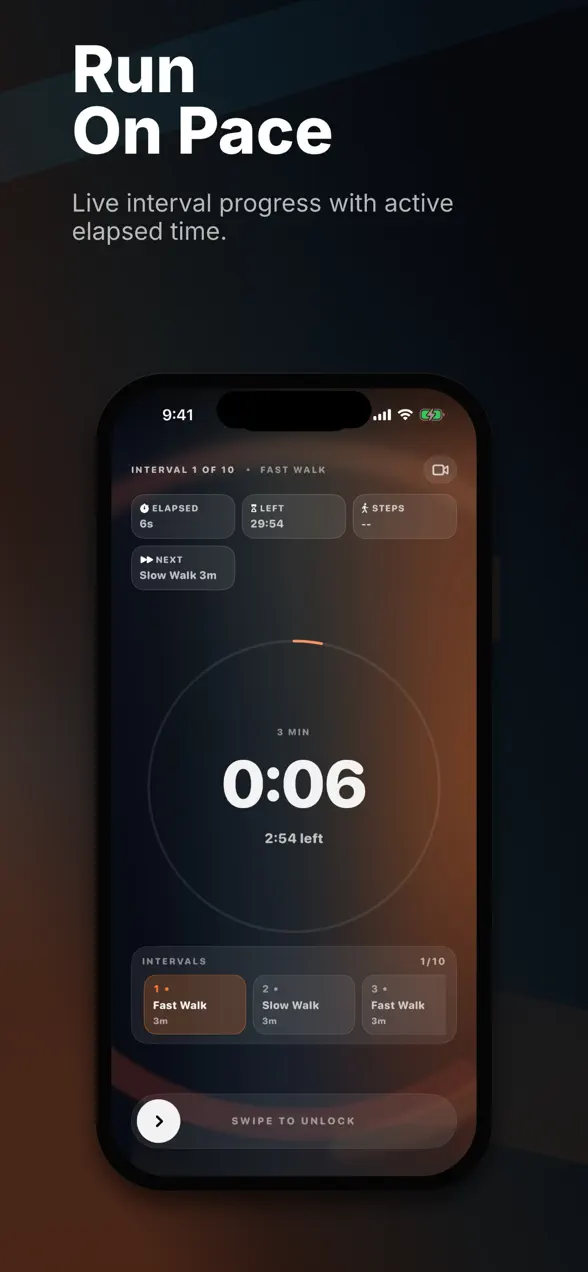
What is Tempo?
Tempo is a timer for any workout built from work and rest. You build a session from intervals (work, rest, warmup, cooldown) and repeat groups, give each one a label, and Tempo counts you through it with spoken cues, sounds, haptic countdown ticks and a large readout you can see mid-effort. What sets it apart from a plain countdown is that an interval doesn't have to be a length of time: it can be 400 meters measured by GPS, or (with Premium) 500 steps counted by your phone.
| Platform | iPhone and iPad, iOS 26 or later (no Apple Watch app) |
|---|---|
| Price | Free with an ad before a workout starts and a limit on custom workouts. Premium: $0.99/week or $5.99 lifetime |
| Interval types | Time or distance (GPS), with optional goal times; step-based intervals with Premium |
| Cues | Spoken, sound and haptic, mixed with your music |
| History | Every workout saved with splits; redo any past session |
| Premium extras | Unlimited custom workouts, no start ads, video mode, step intervals, live heart rate, calories and steps |
The built-in presets
Tempo ships with twelve ready-made workouts, so you can start without building anything:
- Tabata 20/10: 8 rounds of 20 s work, 10 s rest.
- Japanese 3-3 Walk: 5 rounds of 3 min fast walk, 3 min slow walk (30 minutes).
- Simple Interval: 10 rounds of 30 s work, 30 s rest.
- EMOM 12: 12 rounds of 45 s work, 15 s reset.
- Low-Impact HIIT: 4 rounds of squat, step jack, lunge and push-up, 40 s on, 20 s off.
- Abs & Core 45/15: 3 rounds of plank, dead bug, bicycle and side plank.
- Jump Rope 30/30: 3 min warmup, 10 rounds of 30 s jump, 30 s rest, 2 min cooldown.
- Boxing 3-Min Rounds: 5 rounds of 3 min on, 1 min rest, with warmup and cooldown.
- Mobility Flow: seven 1-minute blocks from neck to calves.
- 5 × 400m @ 1:30, Quick Mile and Pyramid 100/200/400/200/100: GPS distance workouts for running.
How to set up a Tabata workout
The fastest way is the Tabata 20/10 preset: open the Timer tab, tap it under Quick Timers, and press Start. It runs 8 rounds of 20 seconds on and 10 seconds off, 4 minutes in total. To build your own version:
- Tap Create, then add a 3 to 5 minute interval labeled "Warmup".
- Add a repeat group and set it to 8 times.
- Inside the group, add a 20-second Time interval labeled with your exercise (say, "Burpees"), then a 10-second interval marked as rest.
- Add a cooldown, save, and start.
A note on intensity: the protocol comes from a 1996 study by Izumi Tabata and colleagues, in which seven subjects did 7 to 8 bouts of 20 seconds on a cycle ergometer at about 170% of their VO2max, with 10 seconds of rest, five days a week for six weeks. Their VO2max rose by 7 ml/kg/min and their anaerobic capacity by 28% (Tabata et al., Medicine & Science in Sports & Exercise, 1996). That's far harder than most "Tabata" classes. The timer gives you the structure; the effort is up to you.
How to set up a Japanese interval walking session
Japanese interval walking alternates 3 minutes of fast walking with 3 minutes of easy walking. Tempo's Japanese 3-3 Walk preset does five rounds, 30 minutes in all. To use it well:
- Open the preset and turn on Track distance if you're outdoors and want GPS distance in your history. With Premium you can also turn on Track steps to add live step counts to the workout.
- Leave Audio cues on. You'll hear the switch between fast and slow, so you can keep your phone in your pocket.
- For the fast intervals, walk hard enough that you can talk only in short phrases. For the slow ones, recover completely.
- Aim for four or more sessions a week.
The method was developed at Shinshu University in Japan. In a 5-month trial of 246 adults averaging 63 years old, participants were asked to do five or more sets of 3 minutes above 70% of their peak aerobic capacity for walking and 3 minutes at 40%, at least four days a week. The interval group improved thigh strength by 13 to 17% and peak aerobic capacity for walking by 9%, more than a group walking continuously at moderate intensity, and saw a larger drop in systolic blood pressure (Nemoto et al., Mayo Clinic Proceedings, 2007). I compared the method with step goals in Japanese walking vs 10,000 steps, and looked at the heart-health research in walking for heart health and VO2 max.
How to set up a distance-based run interval with GPS
Distance intervals are where Tempo differs most from a plain timer. The 5 × 400m @ 1:30 preset is a good template: a 10-minute warmup, then five rounds of 400 meters hard with a 1:30 goal time and 60 seconds of recovery, then a 5-minute cooldown. To build your own:
- Tap Create and add a warmup interval by time.
- Add a repeat group. Inside it, add a Distance interval (for example 800 m) and give it a goal time. Tempo coaches you on whether you're ahead of or behind that pace.
- Add a recovery interval by time, marked as rest.
- Before you start, check the GPS quality indicator on the start screen and wait for a good signal.
Two tips from my own runs: GPS is least reliable among tall buildings and under heavy tree cover, so short reps like 100 m are best on open ground. And on a treadmill, where GPS can't help, either switch to time-based intervals or, with Premium, use a Steps interval, which counts steps with your phone's motion sensors.
Cues, history and video mode
Tempo speaks the transitions ("Go", "Rest", "Done"), warns you before an interval ends, and ticks down the last seconds with haptics. Its audio mixes with your music rather than pausing it. After each workout you get a summary with splits, and you can redo any past session from History.
Premium adds video mode, which overlays the timer on your front or back camera so you can film form checks or workout clips with the countdown in shot, and live heart rate, calories and steps during a workout.
What's free and what Premium adds
Free: the presets, the builder with time and GPS distance intervals, cues, history and splits. Before each workout starts you watch a short ad, and there's a limit on how many custom workouts you can save. Tempo Premium ($0.99 a week or $5.99 once for lifetime access): unlimited custom workouts, no start ads, video mode, step-based intervals, and live heart rate, calories and steps. If you plan to keep it, lifetime is cheaper than about six weeks of the weekly plan.
What Tempo doesn't do, and who should look elsewhere
- It needs iOS 26. If your iPhone can't run iOS 26, Tempo won't install.
- No Apple Watch app. The timer runs on your phone. If you want to control intervals from your wrist, look at a timer with a Watch app; I compared Tempo with one in Tempo vs Seconds.
- No Android version.
- It's a timer, not a coach. Presets give you structure, not a progressive training plan. For short sessions that are actually worth doing, see quick workouts that actually work.
- The free version has an ad before each workout. If that breaks your flow, Premium removes it.
If you lift as well, Tempo pairs with a strength log like Phyziq.
Frequently asked questions
Is Tempo free?
Tempo is free to download and use, with an ad before a workout starts and a limit on how many custom workouts you can save. Tempo Premium costs $0.99 a week or $5.99 once for lifetime access, and adds unlimited custom workouts, no start ads, video mode, step-based intervals, and live heart rate, calories and steps.
Does Tempo have a Tabata timer?
Yes. The Tabata 20/10 preset runs 8 rounds of 20 seconds of work and 10 seconds of rest, which is 4 minutes. You can also build your own version with a warmup, a different number of rounds, or labels for each exercise.
Can Tempo time intervals by distance or steps?
Yes. Each interval can be based on time or on distance measured with GPS, and with Premium also on a number of steps counted by your iPhone's motion sensors. Distance intervals can have a goal time, and Tempo tells you if you're ahead of or behind that pace.
Which devices does Tempo run on?
Tempo runs on iPhone and iPad and requires iOS 26 or later. There is no Apple Watch app. Its audio and haptic cues play alongside your music instead of stopping it.
First published . Updated September 26, 2026: corrected what's free and what Premium costs, added setup guides for Tabata, Japanese interval walking and GPS distance intervals with sources, and listed the built-in presets.
